Task Submission Overview
This page explains how tasks work in Transformer Lab and how the different pieces fit together. It links out to focused guides for the GUI, CLI, and advanced task configurations.
If you want the fastest path from setup to first run, start with Quick Start.
Experiments, tasks, and jobs
- An experiment is a logical workspace (for example, a project or study).
- A task is a reusable template that knows:
- What command to run.
- What resources it needs (CPUs, memory, accelerators, etc.).
- Optional parameters and sweeps.
- A job is a single run of a task:
- Created when you queue a task on a compute provider (via GUI or CLI).
- Tracks status, logs, metrics, and artifacts.
You typically:
- Pick or create an experiment.
- Attach one or more tasks to that experiment (from the Tasks Gallery, task.yaml uploads, or CLI).
- Queue those tasks on a provider to create jobs.
Task definitions (task.yaml)
Most reusable tasks are defined with a task.yaml file. Conceptually it looks like:
name: my-task
resources:
  compute_provider: my-provider
  cpus: 2
  memory: 4
envs:
  SOME_ENV: value
setup: 'optional setup command'
run: 'python train.py'
github_repo_url: 'https://github.com/your-org/your-repo'
github_repo_dir: 'optional/subdir'
github_repo_branch: 'optional-branch'
parameters:
  learning_rate:
    type: float
    default: 0.0003
    min: 0.00001
    max: 0.01
    ui_widget: slider
    title: Learning rate
  model_id:
    type: string
    ui_widget: lab_model_select
    title: Base model
sweeps:
  sweep_config:
    learning_rate: [0.0001, 0.0003, 0.001]
  sweep_metric: eval/loss
  lower_is_better: true
Transformer Lab reads this YAML and turns it into task metadata that:
- Powers the parameter editors in the GUI and interactive CLI.
- Controls hyperparameter sweeps when
sweepsis present.
For complete YAML field documentation, see Task YAML Structure and Task Parameters.
High‑level ways to submit tasks
There are two main ways to submit tasks; they share the same underlying task metadata and providers:
-
GUI (recommended if you prefer a visual workflow)
-
In an experiment’s Tasks tab, click New to open the Add New Task dialog.
-
Choose one of three options:
- From GitHub: point at a repo (and optional subdirectory/branch) that contains a
task.yaml. - Upload from your Computer: drag‑and‑drop or pick a folder that contains a
task.yaml. - Start with a blank task template: create a new, minimal task and edit its YAML later.
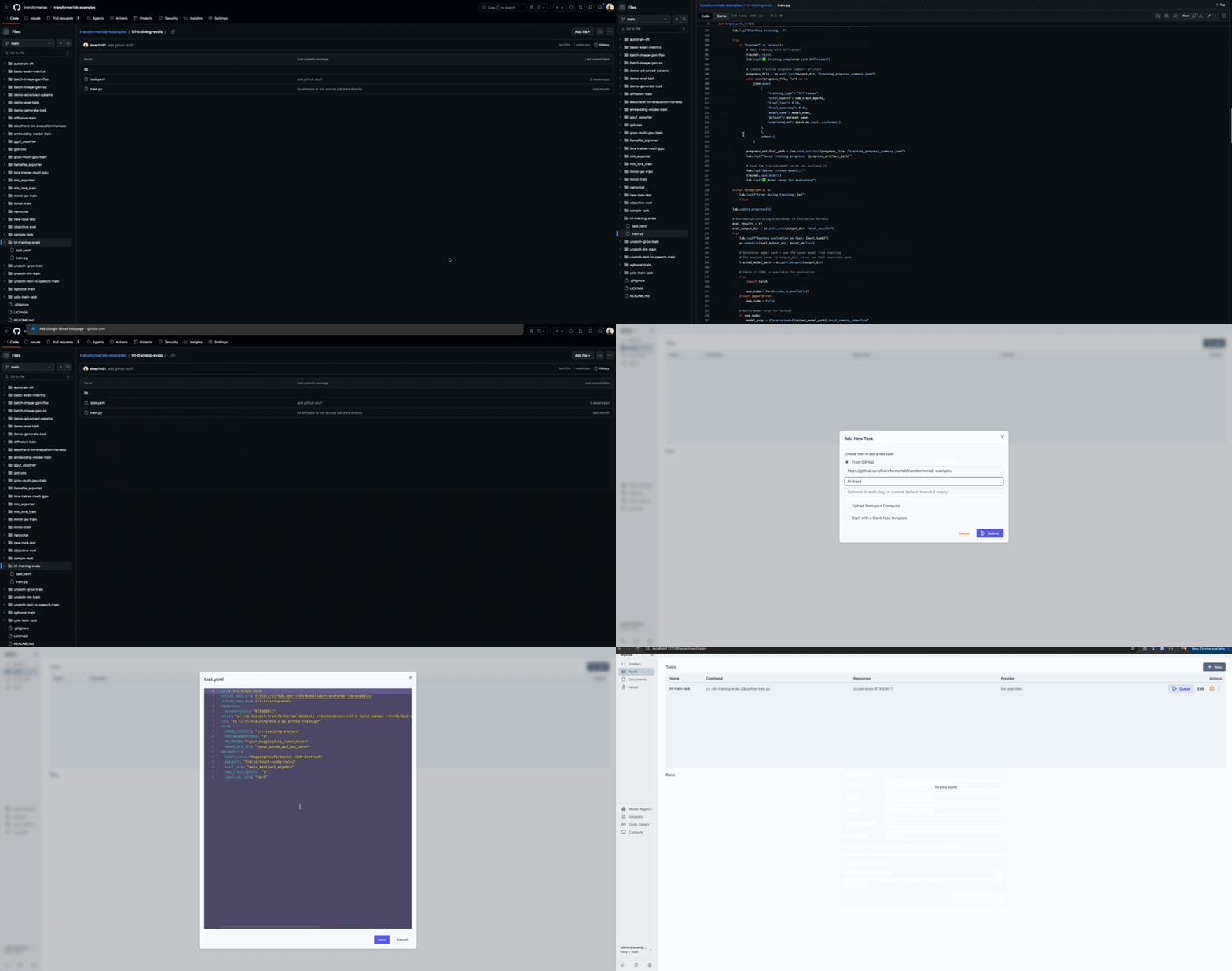
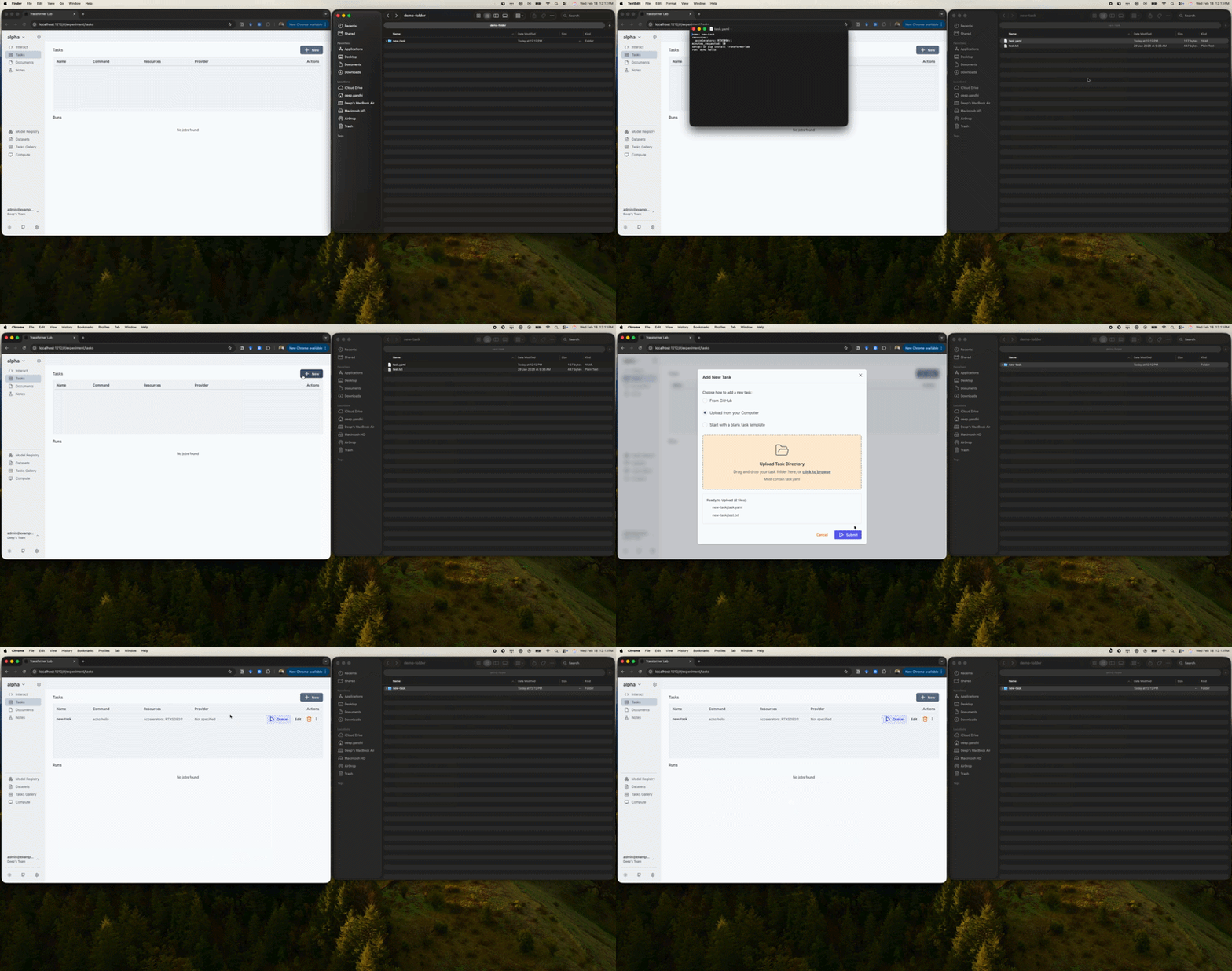
- From GitHub: point at a repo (and optional subdirectory/branch) that contains a
-
If you create a task from GitHub, the cloned repository/subdirectory is available at
~/<github repo name or subdirectory name>on the executing node. -
If your selected directory does not contain
task.yaml, you can still create a blank task and define it in the GUI. -
After the task exists in your experiment, use the Queue action in the Tasks table to open the Queue Task dialog, which:
- Reads
parametersfrom the task and shows the corresponding form controls. - Lets you choose a compute provider from your team’s providers.
- Optionally enables sweeps via the Hyperparameter Sweeps section.
- Reads
-
See this link for a step‑by‑step walkthrough of this flow.
-
-
CLI (
labcommand, for terminal and automation use)-
Define a task in a directory with
task.yaml. -
Register it to the current experiment with:
lab task add ./my-task-directory -
Then queue it on a provider with:
lab task queue <task-id> -
The CLI will:
- Use the task’s defined parameters to prompt for values (or apply defaults with
--no-interactive). - Send a launch request to the selected compute provider to create a job.
- Use the task’s defined parameters to prompt for values (or apply defaults with
-
See this link for concrete examples.
-
Using your own training scripts inside tasks
If the task’s run command launches your own training or evaluation script, you can make small additions so that the script reports into the job that the task has already created:
- Import the lab facade and call
lab.init()at the start of your script. - Use
lab.set_config(...)andlab.log_metric(...)as needed. - Call
lab.finish(...)when done.
When a job is launched via a compute provider, the lab SDK automatically attaches to that job so your script logs into the right place without extra wiring in task.yaml. See this link for details.
Advanced: sweeps and metrics
For advanced hyperparameter sweeps:
- Use the
sweepsblock intask.yamlto define:- Which parameters to sweep (
sweep_config). - Which metric to optimize (
sweep_metric). - Whether lower or higher metric values are better (
lower_is_better).
- Which parameters to sweep (
- In the GUI, turn on Run Hyperparameter Sweeps in the Queue Task dialog and pick which parameters to sweep and which metric to use.
See this link for concrete sweep examples that match this behavior.