Autoresearch
What is Autoresearch?
Autoresearch is an agent-driven optimization loop layered on top of the lab CLI. Instead of running one experiment at a time and manually deciding what to try next, you hand a research goal to an agent (e.g. Claude Code) and it iterates on its own:
- picks the next idea from a backlog,
- queues it as a job on a Compute Provider,
- scores the result via
lab.finish(score=…), - keeps it if the metric improved, discards it otherwise,
- updates the running session notes, and
- repeats — up to the parallelism and iteration budget you set.
Everything is stored on standard Transformer Lab primitives: one experiment per autoresearch session, one job per iteration. The session plan — objective, metric, files in scope, constraints, backlog, what's been tried — lives in experiment notes (lab notes) on the experiment record itself. A fresh agent (after a context reset, restart, or even a different machine) runs lab notes show --raw to rehydrate the full session context and continue exactly where the previous agent stopped.
There is no separate UI widget; the deliverable is the experiment itself, which you can browse on the Jobs page like any other run.
Prerequisites
-
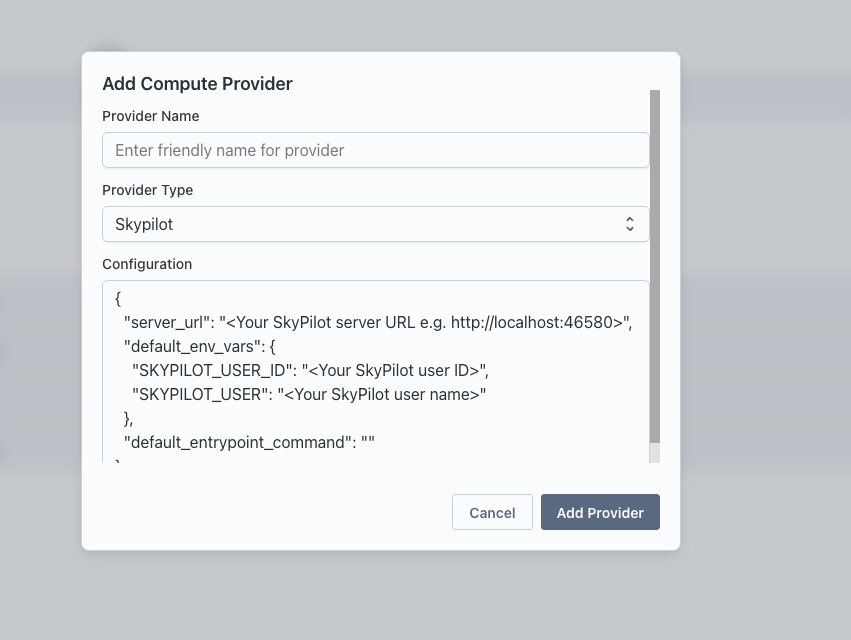
A working Compute Provider (Local / SkyPilot / Slurm / RunPod). Set this up in Team Settings → Compute Providers and run a health check.
-
The
labCLI installed and authenticated (uv tool install transformerlab-cli, thenlab loginwith an API key from Team Settings). See Submitting Tasks via the CLI if you don't have it set up yet. -
An agent harness with the Transformer Lab agent skill installed. The skill wraps the
labCLI so the agent uses ordinary CLI commands; you don't need to learn a new SDK. Install it once per project with:lab install-agent-skill# or, equivalently:npx skills add transformerlab/transformerlab-app --skill transformerlab-cliThis adds the
/lab-autoresearchslash command (alongside the rest of thelabCLI knowledge) to your agent. See Task Submission Using AI Agents for full install details and prerequisites.
Starting a session: /lab-autoresearch init
Trigger the agent with /lab-autoresearch init <your goal> (or just say "run autoresearch on …"). The agent will gather a few things from you, asking only what it can't infer from context:
| Question | Example answer |
|---|---|
| Goal — what's being optimized, in plain language | "minimize validation loss on shakespeare_char with nanoGPT" |
| Primary metric — name, unit, direction | val_bpb, bits per byte, lower is better |
| Secondary metrics — tradeoff monitors that don't gate keep/discard | val_loss, elapsed_seconds |
Task — existing task ID, or a new task to scaffold via lab task init | scaffold from local dir |
| Provider — which Compute Provider to target | skypilot1 |
Parallelism — max concurrent jobs (default 1) | 2 |
| Max iterations — optional cap to bound cost | 20 |
Once these are set, the agent:
- creates a fresh experiment (
autoresearch-<slug>-<date>) and switches to it, - writes the session plan to experiment notes (
lab notes append) using the template below, - queues the baseline job — an unmodified run that establishes the initial metric value.
The session contract: experiment notes
The experiment notes hold the entire session plan and act as the single source of truth that any future agent reads to continue the work. You can view them at any time:
lab notes show          # rendered Markdown
lab notes show --raw    # raw Markdown (what agents read on resume)
lab notes edit          # open in $EDITOR
lab notes append "..."  # append a line — used for new Backlog ideas and run-result entries
The agent writes the plan in this shape:
# Autoresearch: <goal>

**Experiment:** `autoresearch-<slug>-<date>`
**Primary metric:** `<name>` — <unit>, <lower|higher> is better
**Secondary metrics:** `<name>`, `<name>`
**Task:** `<task_id>`
**Provider:** `<provider_name>`
**Parallelism:** <N>
**Max iterations:** <N or "unbounded">

## Objective

<One paragraph: what's being optimized and the workload.>

## Files in scope

<Files the agent may modify — the mutable implementation under test.>

## Off limits

<The fixed evaluator — the score-computation code that feeds lab.finish(score=…).
The agent must not modify these even to "fix" a regression.>

## Constraints

<Hard rules: tests must pass, no new deps, no GPU > X, etc.>

## Backlog

<Promising ideas not yet tried.>

## What's been tried

<Updated by the agent every ~5 iterations: hypothesis, result, what was learned.>
The most important property of the loop is the fixed-evaluator / mutable-implementation split: the score computation is treated as a fixed evaluator, and only the implementation under test is editable. This is what stops the agent from "winning" by gaming the metric.
Running the loop: /lab-autoresearch run
Once init is done, say /lab-autoresearch run (or just "go"). The agent enters an autonomous loop and won't ask "should I continue?" — it keeps iterating until you interrupt, the iteration cap is reached, or it exhausts the Backlog.
Each iteration the agent:
- Re-reads the session plan with
lab notes show --rawand pulls the current best + last few runs fromlab job list --score-metric <primary>. - Picks the next idea (from Backlog, or from inspecting the task code).
- Queues a job with
lab task queue— including a short, specific--descriptionthat captures what changed, what hypothesis is being tested, and what to remember if it fails. - In parallel mode, immediately picks the next idea (fire-and-advance) until the parallelism budget is full.
- Scores completed jobs and discards anything that didn't beat the current best.
You can intervene at any time with plain language:
| Say… | The agent runs… |
|---|---|
| "show me status" | lab job list --score-metric <primary> --score-order asc + a short summary |
| "keep job X" / "discard job X" | lab job discard <id> (with --undo for keep) |
| "add an idea: try cosine LR decay" | lab notes append "- try cosine LR decay" (appends to the Backlog section) |
| "stop everything" | lab job stop on every running job |
| "stop the loop" | just stops iterating; experiment and jobs are untouched |
Hyperparameter sweeps
When the next idea is purely numeric (vary learning_rate × batch_size across a grid), the agent prefers a Transformer Lab sweep over manually queuing N jobs:
# in task.yaml
parameters:
  learning_rate: 1e-5
  batch_size: 32
sweeps:
  sweep_config:
    learning_rate: ['1e-5', '3e-5', '1e-4']
    batch_size: ['16', '32', '64']
  sweep_metric: 'eval/loss'
  lower_is_better: true
Sweeps run as one coordinated job that fans out internally — single description, single artifact bundle, cleaner dashboards. Use the per-iteration --param key=value flow only for ideas that are not pure hyperparameter combinations (swapping the optimizer, restructuring the model, changing setup steps).
Wrapping up: /lab-autoresearch finalize
When you're done, say /lab-autoresearch finalize. The agent:
-
identifies the best non-discarded run,
-
writes a final summary to What's been tried in the experiment notes (best result, key wins, dead ends, leftover Backlog) via
lab notes append(or a full rewrite vialab notes editfor periodic consolidation), -
offers to publish the resulting model or dataset to the registry:
lab job publish model <BEST_JOB_ID> <MODEL_NAME> --group "<group>" --mode new --tag latest -
reports the experiment ID so you can re-enter the session later.
The experiment, jobs, and notes are kept — nothing is deleted. To resume:
lab experiment set-default <session-experiment-id>
# then in the agent:
/lab-autoresearch run
Tips
- Run descriptions are the durable record. Every job's
--descriptionis a mini commit message: what changed vs the prior best, the hypothesis, and what to remember if it fails. The agent two iterations from now relies on these to avoid re-treading dead ends. - Update What's been tried every ~5 runs. Discarded runs lose their code — this section is the only durable record of why dead ends were dead.
- The agent uses the
labCLI for everything. If something seems broken, run the correspondinglabcommand yourself to verify — there is no hidden REST workaround the agent is using.